
The most maintainable way to structure a React project in 2026 is by feature. Group everything that belongs to one part of your product (components, hooks, API calls and types) in a single folder, expose only a small public API through an index file, and keep generic code in a separate shared folder. Then let your linter enforce the import rules, so the structure does not erode over time.
This guide shows the folder structure, the rules that keep it healthy, and the linter configuration that enforces them. The example was built with React 19 and Vite, and every lint rule was checked against both valid and invalid imports.
I did not start with this approach. At school, I learned to organize a project by file type. Then I worked in a company, and I saw the limits of that structure: with many more dependencies, a small change in one place causes unwanted side effects in others, and the code becomes extremely rigid. That experience is what made me move to a feature-based structure.
The problem with organizing a React project by file type
Most React projects start like this: a components folder, a hooks folder, an api folder and a types folder. It works well for a small project. Then the project grows, and the problems appear:
- One change touches many folders. To modify a single feature, you open files in four or five different places.
- Folders become long lists of unrelated files, and
componentsturns into a junk drawer. - Nobody knows what belongs together. You are afraid to delete a file, because you cannot tell who uses it.
- Everything can import everything. Dependencies get tangled, and circular imports are only a matter of time.
What is a feature-based architecture?
In a feature-based architecture, the first level of folders is not the type of file but the part of the product. A feature is an area that a user could name: authentication, tasks, billing, settings. Everything needed for that area lives in its folder: the UI, the logic, the API calls and the types.
The goal is simple: code that changes together stays together. When you work on tasks, you work in features/tasks. When you remove a feature, you delete one folder.
The folder structure
Here is the structure of the example project:
src/
├── app/
│   └── App.tsx                             # composes the features
├── features/
│   ├── auth/
│   │   ├── api/
│   │   │   └── login.ts
│   │   ├── components/
│   │   │   └── LoginButton.tsx
│   │   ├── hooks/
│   │   │   └── useSession.ts
│   │   ├── index.ts                        # public API of the feature
│   │   └── types.ts
│   └── tasks/
│       ├── api/
│       │   └── getTasks.ts
│       ├── components/
│       │   └── TaskList.tsx
│       ├── hooks/
│       │   └── useTasks.ts
│       ├── index.ts                        # public API of the feature
│       └── types.ts
├── shared/
│   ├── components/
│   │   └── Button.tsx
│   └── lib/
│       └── http.ts
└── main.tsx                                # entry point
There are three layers:
appis the glue. It holds the providers, the routing and the composition of features. In our example, it is justApp.tsx.featurescontains one folder per feature. Each one owns its components, hooks, API calls and types, and exposes a public API through itsindex.ts.sharedholds generic code with no business logic: aButton, an HTTP client, date helpers.
The dependency rules
A good structure is not only about folders, it is about which folders may import which. Here are the four rules:
sharedimports nothing fromfeaturesorapp.- A feature can import from
shared, but never fromapp. - A feature never imports another feature. If two features must work together, you compose them in
app. appimports a feature only through itsindex.ts.
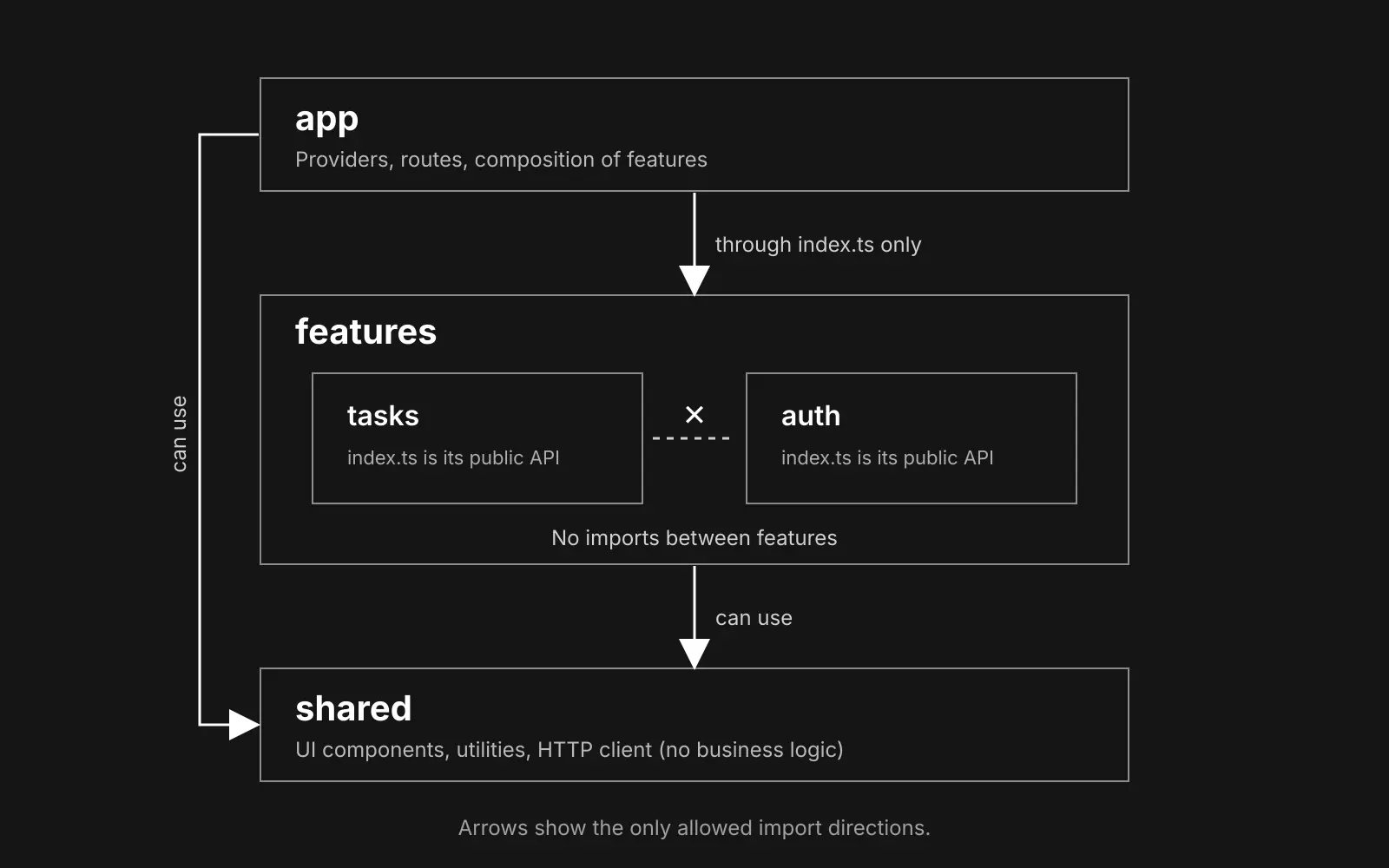
Dependencies flow in one direction, from app to features to shared. That is what prevents circular imports, and what makes a feature easy to move or delete: the only place that knows about it is app.
A real example
Let's look at the code. Each feature exposes only what other parts of the app need, through its index.ts. Everything else stays private:
export { TaskList } from "./components/TaskList";
export type { Task } from "./types";
Inside the feature, the layers are simple. The API call uses the shared HTTP client:
import { http } from "@/shared/lib/http";
import type { Task } from "../types";

export const getTasks = () => http<Task[]>("/tasks");
A hook calls the API and manages the loading and error states:
import { useEffect, useState } from "react";
import { getTasks } from "../api/getTasks";
import type { Task } from "../types";

export function useTasks() {
  const [tasks, setTasks] = useState<Task[]>([]);
  const [loading, setLoading] = useState(true);
  const [error, setError] = useState<Error | null>(null);

  useEffect(() => {
    getTasks()
      .then(setTasks)
      .catch(setError)
      .finally(() => setLoading(false));
  }, []);

  return { tasks, loading, error };
}
And the component uses the hook:
import { useTasks } from "../hooks/useTasks";

export function TaskList() {
  const { tasks, loading, error } = useTasks();

  if (loading) return <p>Loading…</p>;
  if (error) return <p role="alert">Could not load tasks.</p>;

  return (
    <ul>
      {tasks.map((task) => (
        <li key={task.id}>{task.title}</li>
      ))}
    </ul>
  );
}
Notice that inside the feature, files import each other with relative paths (../hooks/useTasks). Across layers, we use the @/ alias. This convention makes it easy to tell, at a glance, whether an import stays inside a feature or crosses a boundary.
The app layer composes the features, importing them only through their public API:
import { LoginButton } from "@/features/auth";
import { TaskList } from "@/features/tasks";

export function App() {
  return (
    <main>
      <header>
        <LoginButton />
      </header>
      <TaskList />
    </main>
  );
}
Set up the @/ alias
The @/ alias points to the src folder. In tsconfig.app.json, add a paths entry in compilerOptions:
{
  "compilerOptions": {
    "paths": { "@/*": ["./src/*"] }
  }
}
And in vite.config.ts, tell Vite how to resolve it:
import { fileURLToPath, URL } from "node:url";
import react from "@vitejs/plugin-react";
import { defineConfig } from "vite";

export default defineConfig({
  plugins: [react()],
  resolve: {
    alias: { "@": fileURLToPath(new URL("./src", import.meta.url)) },
  },
});
Enforce the rules with your linter
Rules that only live in a README get broken. The best way to protect the architecture is to make the linter fail when someone breaks it. The core no-restricted-imports rule is enough, with a different set of restrictions for each layer:
import js from "@eslint/js";
import { defineConfig } from "eslint/config";
import tseslint from "typescript-eslint";

const forbid = (patterns) => ({
  "no-restricted-imports": ["error", { patterns }],
});

export default defineConfig(
  { ignores: ["dist"] },
  js.configs.recommended,
  tseslint.configs.recommended,

  // shared: generic code, depends on nothing in the app
  {
    files: ["src/shared/**/*.{ts,tsx}"],
    rules: forbid([
      {
        group: ["@/features/**", "@/app/**"],
        message: "Shared code cannot depend on features or on the app layer.",
      },
    ]),
  },

  // features: can use shared, but not the app layer or other features
  {
    files: ["src/features/**/*.{ts,tsx}"],
    rules: forbid([
      {
        group: ["@/app/**"],
        message: "A feature cannot import from the app layer.",
      },
      {
        group: ["@/features/**"],
        message: "A feature cannot import another feature. Compose features in the app layer.",
      },
    ]),
  },

  // app: can use features, but only through their public API (index.ts)
  {
    files: ["src/app/**/*.{ts,tsx}"],
    rules: forbid([
      {
        group: ["@/features/*/**"],
        message: "Import a feature through its index.ts, not through its internal files.",
      },
    ]),
  },
);
Now, if a feature tries to import another feature, the linter refuses:
src/features/auth/components/BadFeature.tsx
  1:1  error  '@/features/tasks' import is restricted from being used by a pattern. A feature cannot import another feature. Compose features in the app layer  no-restricted-imports
The same happens if app reaches into the internal files of a feature instead of using its public API:
src/app/BadDeep.tsx
  1:1  error  '@/features/tasks/hooks/useTasks' import is restricted from being used by a pattern. Import a feature through its index.ts, not through its internal files  no-restricted-imports
Imports through index.ts, and imports from shared, are accepted without any error. Type-only imports (import type) are checked as well.
Using oxlint instead of ESLint
If your project was created with the current Vite template, it uses oxlint. The same rules work there. Add this overrides section to your .oxlintrc.json:
  "overrides": [
    {
      "files": ["src/shared/**/*.{ts,tsx}"],
      "rules": {
        "no-restricted-imports": ["error", { "patterns": [
          { "group": ["@/features/**", "@/app/**"], "message": "Shared code cannot depend on features or on the app layer." }
        ] }]
      }
    },
    {
      "files": ["src/features/**/*.{ts,tsx}"],
      "rules": {
        "no-restricted-imports": ["error", { "patterns": [
          { "group": ["@/app/**"], "message": "A feature cannot import from the app layer." },
          { "group": ["@/features/**"], "message": "A feature cannot import another feature. Compose features in the app layer." }
        ] }]
      }
    },
    {
      "files": ["src/app/**/*.{ts,tsx}"],
      "rules": {
        "no-restricted-imports": ["error", { "patterns": [
          { "group": ["@/features/*/**"], "message": "Import a feature through its index.ts, not through its internal files." }
        ] }]
      }
    }
  ]
A heads-up for new projects: the Vite template installs TypeScript 7, and at the time of writing (November 2026), typescript-eslint does not list it as a supported version. Installing ESLint with typescript-eslint fails with a peer dependency error. You can either use oxlint, or install typescript@~5.9.
A limit to know about
These rules check the import path as written. A relative import that climbs out of the feature, like ../../tasks/components/TaskList, is not detected. Use the @/ alias whenever an import leaves a feature, and keep relative paths for files inside the same feature. If you want stricter checks, a dedicated plugin such as eslint-plugin-boundaries can enforce layers more precisely.
Where does each file go?
When you are not sure where to put a file, these questions usually settle it:
- Used by one feature only? Put it in that feature.
- A generic UI element with no business knowledge (a button, a modal)? Put it in
shared/components. - A utility (an HTTP client, a date formatter)? Put it in
shared/lib. - Business logic needed by two features? Take it as a sign that the boundaries may be wrong. Either merge the two features, or move the generic part to
sharedand keep the business part where it belongs. - Not sure yet if code is reusable? Duplicate it once, and extract it on the third use. A wrong abstraction costs more than a little duplication.
- Tests go next to the code they test.
Start simple
You do not need this structure on day one. A small project with a handful of components is perfectly fine with flat folders. Consider switching when a single change keeps touching many folders, or when components becomes a long list nobody can navigate.
You can also migrate gradually: move one feature at a time into features, and add the lint rules once the structure is in place.
Common mistakes
- Turning
sharedinto a junk drawer. If something has business meaning, it does not belong there. - Making features too small. A feature is not a single component. It is an area of the product that a user could name.
- Huge index files that export everything. The
index.tsof a feature should export only what the rest of the app really needs. - Creating every subfolder upfront. Add
api,hooksorcomponentsonly when a feature needs them. - Importing another feature "just this once". That exception is exactly what the lint rule is there to stop.
What about Next.js?
The same idea applies. In the Next.js App Router, the app directory is used for routing, so keep your route files thin: they should only compose features. Put the real logic in src/features, with the same dependency rules.
Conclusion
A feature-based architecture keeps related code together, makes features easy to delete, and gives each part of the project a clear owner. What makes it last is not the folders, it is the rules: one-way dependencies, a public API per feature, and a linter that enforces them.
If you want to see how I organize my own projects, have a look at my projects, or send me an email.