
To add JWT authentication to a Fastify and React app securely, sign a short-lived access token when the user logs in and keep it in memory on the React side. Store a longer-lived refresh token in an httpOnly cookie, and use it to get a new access token when the first one expires. Rotate the refresh token every time it is used.
That is exactly what we build in this tutorial, step by step, with a complete working example.
I learned this approach during my studies, then put it into practice in a company. It works reliably, and it is quick to set up.
What you will build
- A Fastify API with
POST /auth/login,POST /auth/refresh,POST /auth/logoutand a protectedGET /meroute. - A React app (Vite and TypeScript) that logs in, restores the session after a page reload, and renews the token automatically.
- An authentication system that never touches
localStorage.
You need Node.js 20 or later, and a basic knowledge of React and TypeScript. The code was written and tested with Fastify 5 and React 19.
How JWT authentication works with a refresh token
Here is the whole flow. Steps 1 to 4 are a normal login followed by an authenticated request. Steps 5 to 10 show what happens when the access token has expired.
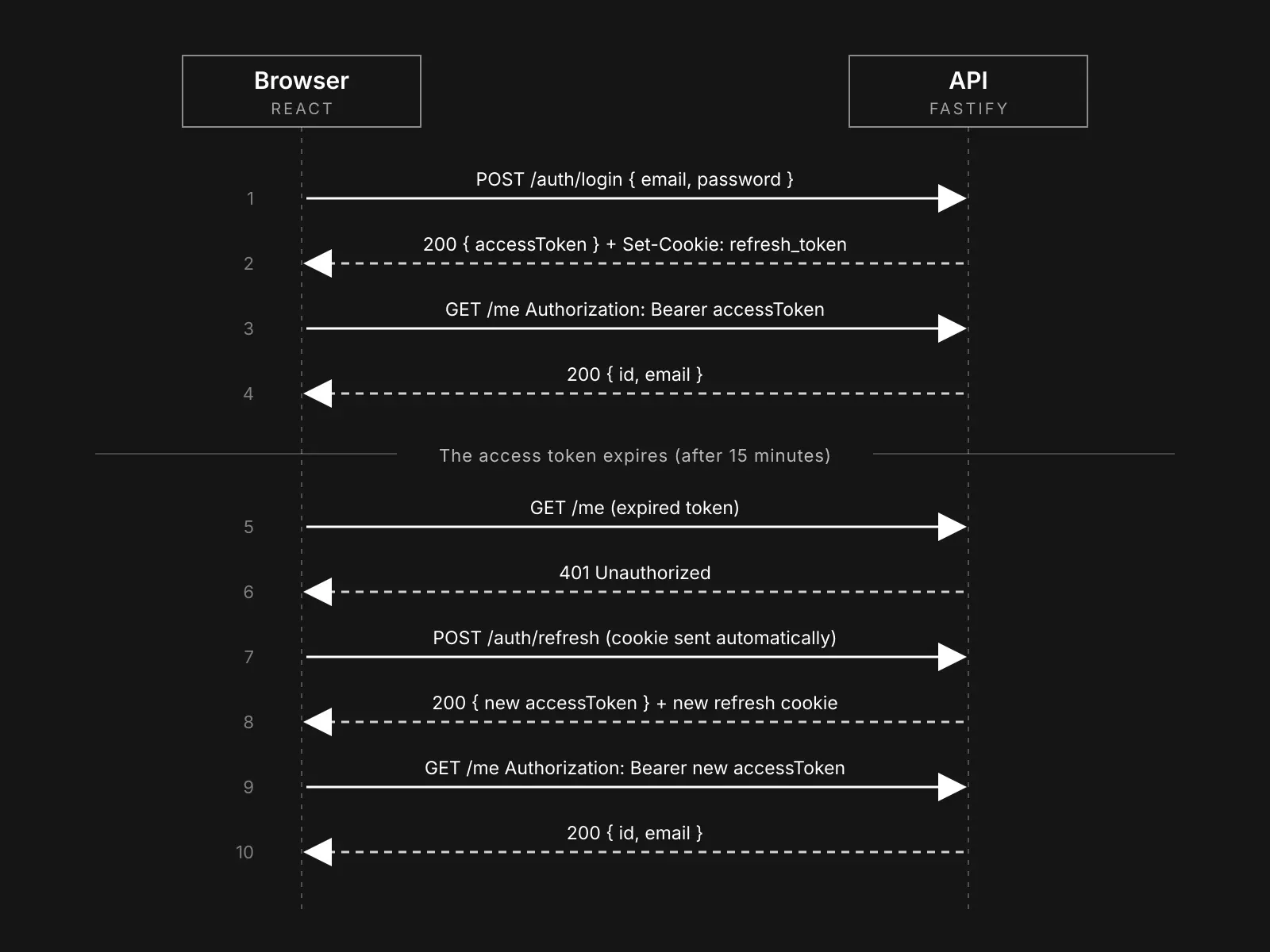
Why two tokens?
A JWT is hard to revoke: once it is signed, it is valid until it expires. If it lives for a week and gets stolen, the attacker has a week. If it lives for 15 minutes, the damage is limited, but you cannot ask users to log in every 15 minutes. That is why we use two tokens:
- The access token is a JWT that lives for 15 minutes. The React app sends it in the
Authorizationheader on every request. - The refresh token lives for 7 days and has one job: getting a new access token. In this tutorial it is an opaque random string, not a second JWT. Because it is stored on the server, you can delete it at any time, for example when the user logs out.
Where to store the tokens in the browser
- The access token stays in memory, in a JavaScript variable. It disappears when the page is reloaded, which is fine because the refresh token brings it back.
- The refresh token goes in an
httpOnlycookie. JavaScript cannot read it, so a script injected into your page (an XSS attack) cannot steal it. - Avoid
localStoragefor tokens: any script running on the page can read it.
One honest limit: httpOnly stops a script from stealing the refresh token, but a script running in your page can still send requests as the user while the page is open. It reduces the damage of an XSS attack, it does not replace protecting against it.
Step 1: Set up the Fastify server
Create the project and install the dependencies:
mkdir jwt-auth && cd jwt-auth
mkdir server && cd server
npm init -y
npm pkg set type=module scripts.dev="tsx watch src/server.ts" scripts.start="tsx src/server.ts"
npm install fastify @fastify/jwt @fastify/cookie @fastify/cors bcryptjs
npm install -D typescript tsx @types/node
mkdir src
Add a tsconfig.json:
{
  "compilerOptions": {
    "target": "ES2022",
    "module": "NodeNext",
    "moduleResolution": "NodeNext",
    "strict": true,
    "esModuleInterop": true,
    "skipLibCheck": true,
    "noEmit": true
  },
  "include": ["src"]
}
We use tsx to run TypeScript directly, and bcryptjs (pure JavaScript, no native build) to hash passwords.
Step 2: Configure Fastify
Create src/server.ts. Start with the imports and the configuration:
import Fastify, { type FastifyReply, type FastifyRequest } from "fastify";
import cors from "@fastify/cors";
import cookie from "@fastify/cookie";
import jwt from "@fastify/jwt";
import bcrypt from "bcryptjs";
import { createHash, randomBytes } from "node:crypto";

// ---------- Configuration ----------
const isProd = process.env.NODE_ENV === "production";
const JWT_SECRET = process.env.JWT_SECRET ?? (isProd ? "" : "dev-only-secret-change-me");
if (!JWT_SECRET) throw new Error("JWT_SECRET is required in production");

const ACCESS_TTL = process.env.ACCESS_TTL ?? "15m"; // short-lived JWT
const REFRESH_TTL_SECONDS = 7 * 24 * 60 * 60; // 7 days
const REFRESH_COOKIE = "refresh_token";
const CLIENT_ORIGIN = process.env.CLIENT_ORIGIN ?? "http://localhost:5173";
In production, the server refuses to start without a JWT_SECRET. Generate a long random value with openssl rand -base64 48 and keep it in an environment variable, never in the code.
Then tell TypeScript what your JWT payload looks like, and declare the authenticate helper we will add in a moment:
declare module "@fastify/jwt" {
  interface FastifyJWT {
    payload: { sub: string; email: string };
    user: { sub: string; email: string };
  }
}

declare module "fastify" {
  interface FastifyInstance {
    authenticate: (request: FastifyRequest, reply: FastifyReply) => Promise<void>;
  }
}
For the tutorial, users live in an array and refresh tokens in a Map. In a real project, both would be database tables (for example with Prisma):
interface User {
  id: string;
  email: string;
  passwordHash: string;
}

const users: User[] = [
  {
    id: "1",
    email: "alice@example.com",
    passwordHash: bcrypt.hashSync("correct-horse-battery", 12),
  },
];

// A hash to compare against when the user does not exist,
// so the response time does not reveal which emails are registered.
const DUMMY_HASH = bcrypt.hashSync("dummy-password", 12);

// Refresh tokens: only the SHA-256 hash is stored, never the token itself.
const refreshTokens = new Map<string, { userId: string; expiresAt: number }>();

const sha256 = (value: string) => createHash("sha256").update(value).digest("hex");
Two details matter here:
- Only the SHA-256 hash of each refresh token is stored. If the data leaks, the stored values cannot be used as tokens.
- The
DUMMY_HASHlets us run a password comparison even when the email does not exist, so the response time does not reveal which emails are registered.
Now create the app, register the plugins and add the authenticate function:
const app = Fastify({ logger: true });

await app.register(cors, { origin: CLIENT_ORIGIN, credentials: true });
await app.register(cookie);
await app.register(jwt, { secret: JWT_SECRET });

app.decorate("authenticate", async (request: FastifyRequest, reply: FastifyReply) => {
  try {
    await request.jwtVerify();
  } catch {
    return reply.code(401).send({ error: "Unauthorized" });
  }
});
The CORS configuration needs credentials: true and an exact origin. A wildcard (*) does not work with cookies.
Step 3: Build the login route
First, a helper that starts a session: it signs the access token and sets the refresh cookie.
// Creates a session: a short-lived access token (JWT) in the response body,
// and a long-lived refresh token in an httpOnly cookie.
async function startSession(reply: FastifyReply, user: User) {
  const accessToken = await reply.jwtSign(
    { sub: user.id, email: user.email },
    { expiresIn: ACCESS_TTL },
  );

  const refreshToken = randomBytes(32).toString("base64url");
  refreshTokens.set(sha256(refreshToken), {
    userId: user.id,
    expiresAt: Date.now() + REFRESH_TTL_SECONDS * 1000,
  });

  reply.setCookie(REFRESH_COOKIE, refreshToken, {
    httpOnly: true, // not readable from JavaScript
    secure: isProd, // HTTPS only in production
    sameSite: "lax", // not sent on cross-site POST requests
    path: "/auth", // only sent to the auth routes
    maxAge: REFRESH_TTL_SECONDS,
  });

  return { accessToken };
}
Each cookie option has a purpose:
httpOnlymakes the cookie invisible to JavaScript.securesends it only over HTTPS. We enable it in production, because local development runs over plain HTTP.sameSite: "lax"prevents the browser from sending the cookie on cross-site POST requests, which protects the refresh route against CSRF.path: "/auth"means the cookie is only sent to the authentication routes, not to every API call.
Now the login route itself:
app.post(
  "/auth/login",
  {
    schema: {
      body: {
        type: "object",
        required: ["email", "password"],
        properties: {
          email: { type: "string" },
          password: { type: "string" },
        },
      },
    },
  },
  async (request, reply) => {
    const { email, password } = request.body as { email: string; password: string };

    const user = users.find((u) => u.email === email.toLowerCase());
    const passwordOk = await bcrypt.compare(password, user?.passwordHash ?? DUMMY_HASH);

    if (!user || !passwordOk) {
      return reply.code(401).send({ error: "Invalid credentials" });
    }
    return startSession(reply, user);
  },
);
Notice that an unknown email and a wrong password return exactly the same error. That way, an attacker cannot use the login form to find out which accounts exist.
Step 4: Protect your routes
Protecting a route takes one line: add app.authenticate to its onRequest hook. It verifies the JWT and rejects the request with a 401 if the token is missing, invalid or expired.
app.get("/me", { onRequest: [app.authenticate] }, async (request) => {
  return { id: request.user.sub, email: request.user.email };
});
Inside the handler, request.user contains the payload you signed: here, the user id and email.
Step 5: Refresh tokens and log out
The refresh route reads the cookie, looks up the hash, and issues a new session.
app.post("/auth/refresh", async (request, reply) => {
  const token = request.cookies[REFRESH_COOKIE];
  const stored = token ? refreshTokens.get(sha256(token)) : undefined;

  if (!token || !stored || stored.expiresAt < Date.now()) {
    reply.clearCookie(REFRESH_COOKIE, { path: "/auth" });
    return reply.code(401).send({ error: "Invalid refresh token" });
  }

  // Rotation: a refresh token can only be used once.
  refreshTokens.delete(sha256(token));

  const user = users.find((u) => u.id === stored.userId);
  if (!user) return reply.code(401).send({ error: "Invalid refresh token" });

  return startSession(reply, user);
});
The important line is the deletion before startSession. This is refresh token rotation: every refresh token can be used only once, and each refresh gives you a new one. A stolen token that was already used no longer works.
Logging out deletes the refresh token on the server and clears the cookie:
app.post("/auth/logout", async (request, reply) => {
  const token = request.cookies[REFRESH_COOKIE];
  if (token) refreshTokens.delete(sha256(token));
  reply.clearCookie(REFRESH_COOKIE, { path: "/auth" });
  return reply.code(204).send();
});
Keep in mind that logging out does not cancel an access token that was already issued: it stays valid until it expires. That is the reason for keeping its lifetime short.
Finally, start the server:
const port = Number(process.env.PORT ?? 3001);
await app.listen({ port, host: "0.0.0.0" });
Run it with npm run dev.
Test the API with curl
Before writing any React code, check that the API behaves as expected. First, log in and save the cookie:
curl -i -c cookies.txt -X POST http://localhost:3001/auth/login \
  -H "content-type: application/json" \
  -d '{"email":"alice@example.com","password":"correct-horse-battery"}'
Copy the accessToken from the response and call the protected route:
curl http://localhost:3001/me -H "authorization: Bearer PASTE_THE_ACCESS_TOKEN_HERE"
Then renew the session with the cookie. Keep a copy of the cookie file first, so you can replay the old token afterwards:
cp cookies.txt old-cookies.txt
curl -b cookies.txt -c cookies.txt -X POST http://localhost:3001/auth/refresh
You get a new access token, and the cookie file now contains a new refresh token. Replaying the old cookie must fail with a 401, which proves that the rotation works:
curl -i -b old-cookies.txt -X POST http://localhost:3001/auth/refresh
Step 6: Build the React client
In the root folder of the project, create the React app and remove the default styles:
npm create vite@latest client -- --template react-ts
cd client && npm install
rm src/App.css src/index.css && rm -r src/assets
Keep the access token in memory
Create src/api.ts. It holds the access token in a variable and wraps fetch:
const API_URL = import.meta.env.VITE_API_URL ?? "http://localhost:3001";

// The access token lives in memory only: no localStorage, no readable cookie.
let accessToken: string | null = null;
Every request uses credentials: "include", otherwise the browser does not send or store the cookie.
The next function renews the access token with the refresh cookie. Notice that several callers share one request:
// Several requests can get a 401 at the same time (or React StrictMode can run
// an effect twice in development). With refresh token rotation, only the first
// call would succeed, so all callers share a single in-flight refresh.
let refreshPromise: Promise<string | null> | null = null;

export function refreshAccessToken(): Promise<string | null> {
  refreshPromise ??= fetch(`${API_URL}/auth/refresh`, {
    method: "POST",
    credentials: "include", // sends the httpOnly refresh cookie
  })
    .then(async (res) => {
      if (!res.ok) return null;
      const data = (await res.json()) as { accessToken: string };
      accessToken = data.accessToken;
      return accessToken;
    })
    .catch(() => null)
    .finally(() => {
      refreshPromise = null;
    });

  return refreshPromise;
}
This detail is easy to miss, and it matters. Because the refresh token rotates, two refresh calls started at the same time would use the same cookie, and the second one would fail. This happens in two situations: when several requests get a 401 together, and in development with React StrictMode, which runs effects twice. Sharing the in-flight request solves both.
Now the function you will use for every protected call. It adds the token, and if the server answers 401, it refreshes the token once and retries:
// fetch() for protected routes: adds the token and retries once after a 401.
export async function apiFetch(path: string, init: RequestInit = {}): Promise<Response> {
  const send = (token: string | null) => {
    const headers = new Headers(init.headers);
    if (token) headers.set("Authorization", `Bearer ${token}`);
    return fetch(`${API_URL}${path}`, { ...init, headers, credentials: "include" });
  };

  const tokenUsed = accessToken;
  let response = await send(tokenUsed);

  if (response.status === 401) {
    // Another request may already have renewed the token while this one was
    // in flight: in that case, just retry with the fresh token.
    const newToken =
      accessToken && accessToken !== tokenUsed ? accessToken : await refreshAccessToken();
    if (newToken) response = await send(newToken);
  }
  return response;
}
If another request already renewed the token while this one was in flight, we simply retry with the new token instead of refreshing again.
Finally, login and logout:
export async function login(email: string, password: string): Promise<void> {
  const response = await fetch(`${API_URL}/auth/login`, {
    method: "POST",
    credentials: "include",
    headers: { "Content-Type": "application/json" },
    body: JSON.stringify({ email, password }),
  });
  if (!response.ok) throw new Error("Invalid email or password");

  const data = (await response.json()) as { accessToken: string };
  accessToken = data.accessToken;
}

export async function logout(): Promise<void> {
  await fetch(`${API_URL}/auth/logout`, { method: "POST", credentials: "include" });
  accessToken = null;
}
Share the authentication state with React
Create the context and a small hook in src/auth-context.ts:
import { createContext, useContext } from "react";

export interface User {
  id: string;
  email: string;
}

export interface AuthState {
  user: User | null;
  loading: boolean;
  login: (email: string, password: string) => Promise<void>;
  logout: () => Promise<void>;
}

export const AuthContext = createContext<AuthState | null>(null);

export function useAuth() {
  const context = useContext(AuthContext);
  if (!context) throw new Error("useAuth must be used inside <AuthProvider>");
  return context;
}
Then the provider in src/AuthProvider.tsx. Its useEffect runs when the page loads and restores the session: since the access token only lived in memory, it asks for a new one with the refresh cookie.
import { useEffect, useState, type ReactNode } from "react";
import { apiFetch, login as apiLogin, logout as apiLogout, refreshAccessToken } from "./api";
import { AuthContext, type User } from "./auth-context";

async function fetchCurrentUser(): Promise<User | null> {
  const response = await apiFetch("/me");
  return response.ok ? ((await response.json()) as User) : null;
}

export function AuthProvider({ children }: { children: ReactNode }) {
  const [user, setUser] = useState<User | null>(null);
  const [loading, setLoading] = useState(true);

  // On page load the access token is gone (it only lived in memory),
  // so we try to restore the session with the refresh cookie.
  useEffect(() => {
    let cancelled = false;

    refreshAccessToken()
      .then((token) => (token ? fetchCurrentUser() : null))
      .then((currentUser) => {
        if (!cancelled) setUser(currentUser);
      })
      .finally(() => {
        if (!cancelled) setLoading(false);
      });

    return () => {
      cancelled = true;
    };
  }, []);

  const login = async (email: string, password: string) => {
    await apiLogin(email, password);
    setUser(await fetchCurrentUser());
  };

  const logout = async () => {
    await apiLogout();
    setUser(null);
  };

  return (
    <AuthContext.Provider value={{ user, loading, login, logout }}>
      {children}
    </AuthContext.Provider>
  );
}
The cancelled flag prevents React from updating state after the component has been cleaned up.
The interface
Wrap the app with the provider in src/main.tsx:
import { StrictMode } from "react";
import { createRoot } from "react-dom/client";
import { AuthProvider } from "./AuthProvider";
import App from "./App";

createRoot(document.getElementById("root")!).render(
  <StrictMode>
    <AuthProvider>
      <App />
    </AuthProvider>
  </StrictMode>,
);
And use the hook in src/App.tsx to show either the login form or the signed-in view:
import { useState, type FormEvent } from "react";
import { useAuth } from "./auth-context";

function LoginForm() {
  const { login } = useAuth();
  const [email, setEmail] = useState("alice@example.com");
  const [password, setPassword] = useState("");
  const [error, setError] = useState<string | null>(null);

  const handleSubmit = async (event: FormEvent) => {
    event.preventDefault();
    setError(null);
    try {
      await login(email, password);
    } catch (err) {
      setError(err instanceof Error ? err.message : "Something went wrong");
    }
  };

  return (
    <form onSubmit={handleSubmit}>
      <h1>Sign in</h1>
      <label>
        Email
        <input type="email" value={email} onChange={(e) => setEmail(e.target.value)} />
      </label>
      <label>
        Password
        <input type="password" value={password} onChange={(e) => setPassword(e.target.value)} />
      </label>
      {error && <p role="alert">{error}</p>}
      <button type="submit">Sign in</button>
    </form>
  );
}

export default function App() {
  const { user, loading, logout } = useAuth();

  if (loading) return <p>Loading…</p>;
  if (!user) return <LoginForm />;

  return (
    <main>
      <h1>Hello, {user.email}</h1>
      <button onClick={logout}>Sign out</button>
    </main>
  );
}
Start both servers, open http://localhost:5173, and sign in with alice@example.com and correct-horse-battery. Reload the page: you stay signed in, because the refresh cookie restores the session.
Common pitfalls
- Refresh requests that run twice. With rotation, a second parallel call fails and logs the user out. In a test, disabling the shared request produced two refresh calls on reload and a signed-out user. With the shared request, there is one call. This is the most common source of "random logouts" in development.
- CORS and cookies. You need
credentials: trueand an exact origin on the server, andcredentials: "include"on every clientfetch. - Different domains. The cookie flow above works when the React app and the API are on the same site, for example
app.example.comandapi.example.com. If they are on completely different domains, you needsameSite: "none"withsecure: true, and browsers that block third-party cookies can break it. Prefer a shared parent domain. - JWT payloads are readable. The payload is only encoded, not encrypted. Never put sensitive data in it.
- A leaked secret breaks everything. Anyone with
JWT_SECRETcan forge tokens. Use a long random value, and keep it out of your repository.
Going to production
This example is deliberately minimal. Before using it for real, add:
- HTTPS everywhere, so the
securecookie flag is enabled. - A real database. Store users and hashed refresh tokens in tables, with an expiration date, and delete expired rows regularly.
- Reuse detection. If a refresh token that was already rotated is presented again, someone may have stolen it. Revoke all the sessions of that user.
- Rate limiting on the login route, for example with the
@fastify/rate-limitplugin, to slow down password guessing. - Input validation and a password policy for registration, which this example does not cover.
Conclusion
You now have a JWT authentication flow that works with Fastify and React: a short-lived access token in memory, a rotating refresh token in an httpOnly cookie, and a client that renews the session on its own. The two details that made the difference when testing were the shared refresh request and the strict CORS and cookie settings.
If you want to see where I use this stack, have a look at my projects, or send me an email.